%22%3E%0A%20%20%20%20%20%20%20%20%20%20%20%20%3Ccircle%20cx%3D%2230%22%20cy%3D%2230%22%20r%3D%2228%22%20fill%3D%22%231E3A8A%22%20%2F%3E%0A%20%20%20%20%20%20%20%20%20%20%20%20%3Ccircle%20cx%3D%2230%22%20cy%3D%2230%22%20r%3D%2224%22%20fill%3D%22%23FFFFFF%22%20%2F%3E%0A%20%20%20%20%20%20%20%20%20%20%20%20%3Ccircle%20cx%3D%2230%22%20cy%3D%2230%22%20r%3D%2218%22%20fill%3D%22none%22%20stroke%3D%22%23FF9933%22%20stroke-width%3D%223%22%20%2F%3E%0A%20%20%20%20%20%20%20%20%20%20%20%20%3Cpath%20d%3D%22M%2030%2018%20L%2030%2042%20M%2018%2030%20L%2042%2030%20M%2021%2021%20L%2039%2039%20M%2021%2039%20L%2039%2021%22%20stroke%3D%22%231E3A8A%22%20stroke-width%3D%222%22%2F%3E%0A%20%20%20%20%20%20%20%20%20%20%20%20%3Ccircle%20cx%3D%2230%22%20cy%3D%2230%22%20r%3D%225%22%20fill%3D%22%231E3A8A%22%20%2F%3E%0A%20%20%20%20%20%20%20%20%20%20%3C%2Fg%3E%0A%20%20%20%20%20%20%20%20%20%20%3Ctext%20x%3D%2282%22%20y%3D%2238%22%20fill%3D%22%230F172A%22%20font-family%3D%22system-ui%2C%20-apple-system%2C%20sans-serif%22%20font-size%3D%2224%22%20font-weight%3D%22800%22%20letter-spacing%3D%22-0.5%22%3ESARATHI%3Ctspan%20fill%3D%22%232563EB%22%3EPARIVAHAN%3C%2Ftspan%3E%3C%2Ftext%3E%0A%20%20%20%20%20%20%20%20%20%20%3Ctext%20x%3D%2284%22%20y%3D%2258%22%20fill%3D%22%2364748B%22%20font-family%3D%22system-ui%2C%20-apple-system%2C%20sans-serif%22%20font-size%3D%2211.5%22%20font-weight%3D%22600%22%20letter-spacing%3D%221.5%22%3ENATIONAL%20CITIZEN%20TRANSPORT%20PORTAL%3C%2Ftext%3E%0A%20%20%20%20%20%20%20%20%3C%2Fsvg%3E%0A%20%20%20%20%20%20)
Driving Licence (DL) Renewal Online Guide
Complete procedure to renew your expired Driving Licence via contactless Aadhaar e-KYC. Learn about medical certificate Form 1A, grace periods, and late fee charges.
Renew Driving Licence Online on sarathi.parivahan.gov.in
Access the official Ministry of Road Transport & Highways (MoRTH) secure portal to submit your renewal application, upload Form 1A medical cert, and pay statutory fees.
You can renew your DL up to 1 year before expiry and within 1 year after expiry without retaking the driving test. If renewed after 1 year of expiry, re-test at the RTO track is mandatory.
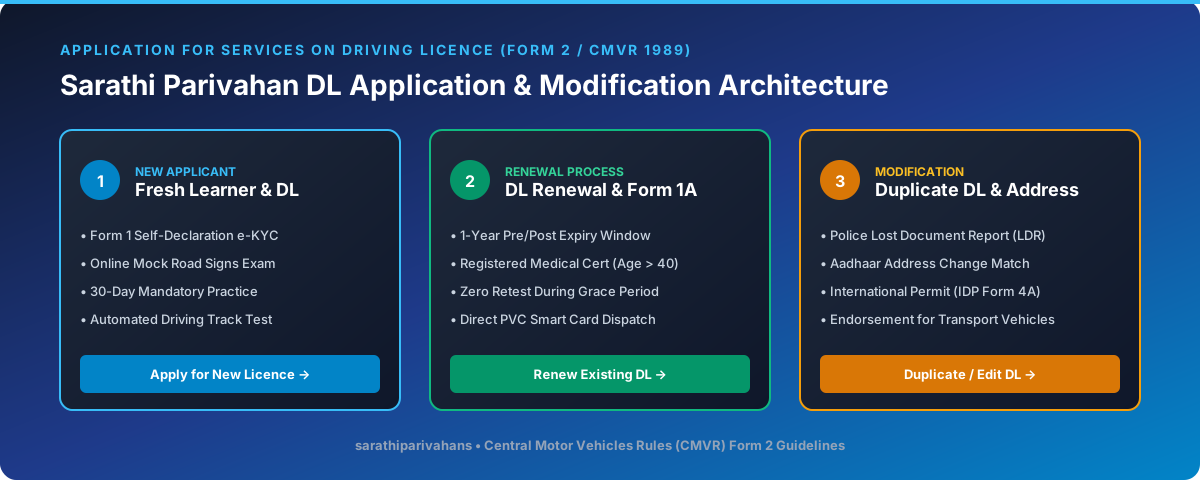
Step-by-Step Online Renewal Process (Sarathi 4.0)
Go to Sarathi Portal & Select State
Open sarathi.parivahan.gov.in, choose your state, and click "Apply for DL Renewal".
Authenticate via Aadhaar e-KYC
Select Aadhaar authentication for faceless contactless processing. Your current photo and residential address will be verified seamlessly.
Upload Form 1A Medical Certificate (If Age > 40)
If you are above 40 years of age or renewing a commercial/transport DL, upload Form 1A signed by a registered MBBS medical practitioner.
Pay Government Renewal Fee
Pay the standard fee of ₹200 (+ ₹200 smart card fee) via Net Banking, Debit Card, or UPI.
Doorstep Delivery via India Post
Your renewed smart card will be dispatched to your Aadhaar address within 7–15 working days. Track delivery via DL Status Tracking.
Frequently Asked Questions
Clear answers to common questions regarding Sarathi 4.0 status tracking, Vahan RC verification, and e-Challan settlements.
Visit the official Sarathi portal (sarathi.parivahan.gov.in), select your state, click on "Application Status" in the top bar, enter your Application Number and Date of Birth (DD-MM-YYYY), complete the captcha, and click Submit. Your current processing stage (Scrutiny, Test, Card Printing, or Postal Dispatch) will be displayed immediately.