%22%3E%0A%20%20%20%20%20%20%20%20%20%20%20%20%3Ccircle%20cx%3D%2230%22%20cy%3D%2230%22%20r%3D%2228%22%20fill%3D%22%231E3A8A%22%20%2F%3E%0A%20%20%20%20%20%20%20%20%20%20%20%20%3Ccircle%20cx%3D%2230%22%20cy%3D%2230%22%20r%3D%2224%22%20fill%3D%22%23FFFFFF%22%20%2F%3E%0A%20%20%20%20%20%20%20%20%20%20%20%20%3Ccircle%20cx%3D%2230%22%20cy%3D%2230%22%20r%3D%2218%22%20fill%3D%22none%22%20stroke%3D%22%23FF9933%22%20stroke-width%3D%223%22%20%2F%3E%0A%20%20%20%20%20%20%20%20%20%20%20%20%3Cpath%20d%3D%22M%2030%2018%20L%2030%2042%20M%2018%2030%20L%2042%2030%20M%2021%2021%20L%2039%2039%20M%2021%2039%20L%2039%2021%22%20stroke%3D%22%231E3A8A%22%20stroke-width%3D%222%22%2F%3E%0A%20%20%20%20%20%20%20%20%20%20%20%20%3Ccircle%20cx%3D%2230%22%20cy%3D%2230%22%20r%3D%225%22%20fill%3D%22%231E3A8A%22%20%2F%3E%0A%20%20%20%20%20%20%20%20%20%20%3C%2Fg%3E%0A%20%20%20%20%20%20%20%20%20%20%3Ctext%20x%3D%2282%22%20y%3D%2238%22%20fill%3D%22%230F172A%22%20font-family%3D%22system-ui%2C%20-apple-system%2C%20sans-serif%22%20font-size%3D%2224%22%20font-weight%3D%22800%22%20letter-spacing%3D%22-0.5%22%3ESARATHI%3Ctspan%20fill%3D%22%232563EB%22%3EPARIVAHAN%3C%2Ftspan%3E%3C%2Ftext%3E%0A%20%20%20%20%20%20%20%20%20%20%3Ctext%20x%3D%2284%22%20y%3D%2258%22%20fill%3D%22%2364748B%22%20font-family%3D%22system-ui%2C%20-apple-system%2C%20sans-serif%22%20font-size%3D%2211.5%22%20font-weight%3D%22600%22%20letter-spacing%3D%221.5%22%3ENATIONAL%20CITIZEN%20TRANSPORT%20PORTAL%3C%2Ftext%3E%0A%20%20%20%20%20%20%20%20%3C%2Fsvg%3E%0A%20%20%20%20%20%20)
Download Vehicle RC Online in PDF Format
Step-by-step guidance on how to download a certified digital copy of your vehicle's Registration Certificate (RC) with official QR code, legally equivalent to a physical smart card.
Download Digitally Signed RC on DigiLocker / Vahan
Access the official National DigiLocker portal (digilocker.gov.in) to generate and download legally valid digital RC certificates with verifiable QR signature under CMVR Rule 139.
As per the Ministry of Road Transport & Highways (MoRTH) circular, digital Vehicle RC certificates generated via DigiLocker or NextGen mParivahan carry legal parity with physical smart cards and must be accepted by all traffic police and enforcement officers.
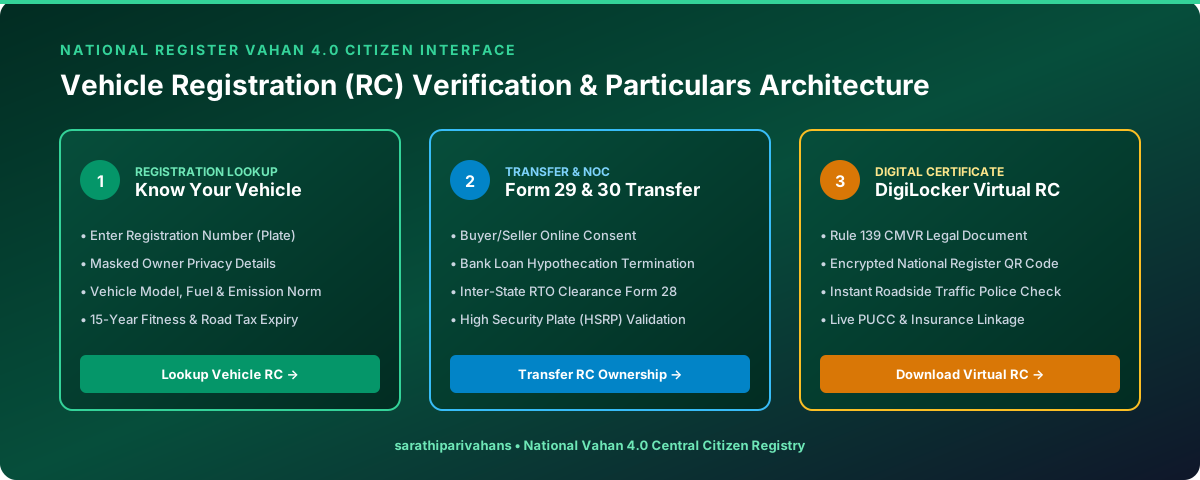
3 Ways to Download / Access Your Virtual Vehicle RC
Download Signed PDF via DigiLocker
- Visit
digilocker.gov.inor open the DigiLocker App on your phone. - Sign in with your Aadhaar Number and 6-digit security PIN.
- Search for Ministry of Road Transport and Highways (MoRTH).
- Select "Registration of Vehicles".
- Enter your Registration Number and Chassis Number (Last 5 Digits).
- Click "Get Document" to fetch and download the official PDF signed with the Digital India verification badge.
Create Virtual RC in NextGen mParivahan App
- Download the official NextGen mParivahan app from Play Store / App Store.
- Register with your mobile number.
- Tap on "Transport Service" → "Create Virtual RC".
- Enter your Vehicle Number, Chassis Number (Last 5 Digits), and Engine Number (Last 5 Digits).
- Your Virtual RC with encrypted QR code will be saved in your dashboard for offline checking.
Print RC Form 23 via Vahan Citizen Portal
- Go to
vahan.parivahan.gov.in. - Select your State & RTO Office.
- Navigate to "Download Document" → "Print RC Particulars (Form 23)".
- Authenticate using your Vehicle Reg Number & Chassis Number with OTP.
Frequently Asked Questions
Clear answers to common questions regarding Sarathi 4.0 status tracking, Vahan RC verification, and e-Challan settlements.
Visit the official Sarathi portal (sarathi.parivahan.gov.in), select your state, click on "Application Status" in the top bar, enter your Application Number and Date of Birth (DD-MM-YYYY), complete the captcha, and click Submit. Your current processing stage (Scrutiny, Test, Card Printing, or Postal Dispatch) will be displayed immediately.