%22%3E%0A%20%20%20%20%20%20%20%20%20%20%20%20%3Ccircle%20cx%3D%2230%22%20cy%3D%2230%22%20r%3D%2228%22%20fill%3D%22%231E3A8A%22%20%2F%3E%0A%20%20%20%20%20%20%20%20%20%20%20%20%3Ccircle%20cx%3D%2230%22%20cy%3D%2230%22%20r%3D%2224%22%20fill%3D%22%23FFFFFF%22%20%2F%3E%0A%20%20%20%20%20%20%20%20%20%20%20%20%3Ccircle%20cx%3D%2230%22%20cy%3D%2230%22%20r%3D%2218%22%20fill%3D%22none%22%20stroke%3D%22%23FF9933%22%20stroke-width%3D%223%22%20%2F%3E%0A%20%20%20%20%20%20%20%20%20%20%20%20%3Cpath%20d%3D%22M%2030%2018%20L%2030%2042%20M%2018%2030%20L%2042%2030%20M%2021%2021%20L%2039%2039%20M%2021%2039%20L%2039%2021%22%20stroke%3D%22%231E3A8A%22%20stroke-width%3D%222%22%2F%3E%0A%20%20%20%20%20%20%20%20%20%20%20%20%3Ccircle%20cx%3D%2230%22%20cy%3D%2230%22%20r%3D%225%22%20fill%3D%22%231E3A8A%22%20%2F%3E%0A%20%20%20%20%20%20%20%20%20%20%3C%2Fg%3E%0A%20%20%20%20%20%20%20%20%20%20%3Ctext%20x%3D%2282%22%20y%3D%2238%22%20fill%3D%22%230F172A%22%20font-family%3D%22system-ui%2C%20-apple-system%2C%20sans-serif%22%20font-size%3D%2224%22%20font-weight%3D%22800%22%20letter-spacing%3D%22-0.5%22%3ESARATHI%3Ctspan%20fill%3D%22%232563EB%22%3EPARIVAHAN%3C%2Ftspan%3E%3C%2Ftext%3E%0A%20%20%20%20%20%20%20%20%20%20%3Ctext%20x%3D%2284%22%20y%3D%2258%22%20fill%3D%22%2364748B%22%20font-family%3D%22system-ui%2C%20-apple-system%2C%20sans-serif%22%20font-size%3D%2211.5%22%20font-weight%3D%22600%22%20letter-spacing%3D%221.5%22%3ENATIONAL%20CITIZEN%20TRANSPORT%20PORTAL%3C%2Ftext%3E%0A%20%20%20%20%20%20%20%20%3C%2Fsvg%3E%0A%20%20%20%20%20%20)
Direct MoRTH eChallan & Virtual Court Portals
Access the official central government servers directly for authentic penalty settlement without third-party fees or data interception.
Traffic e-Challan Payment & Dispute Guide
Learn how to pay traffic violation fines online, view camera photographic evidence, dispute wrong penalty notices, and settle challans via Virtual Courts.
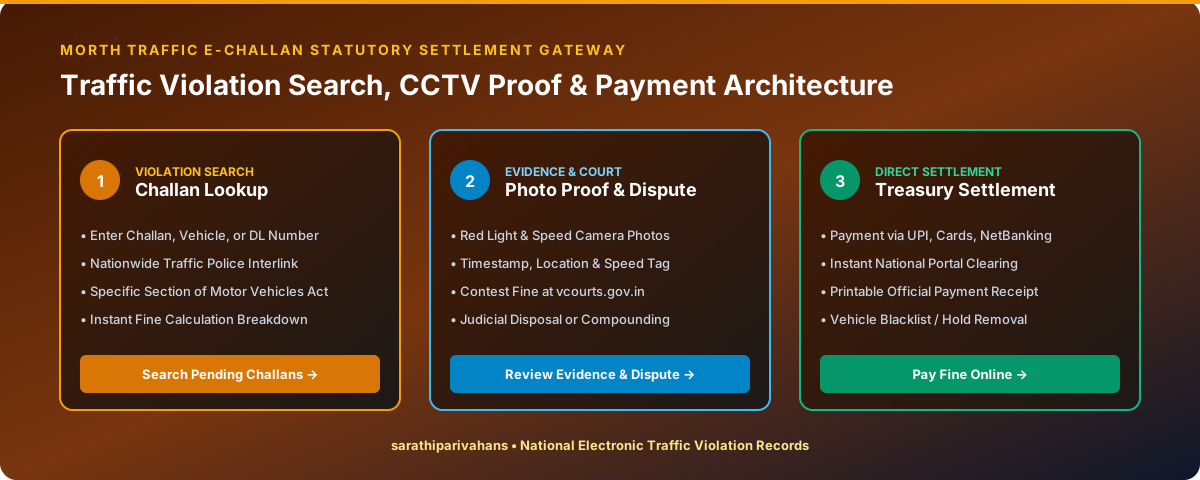
How to Pay Traffic e-Challan Online (Step-by-Step)
Open the MoRTH e-Challan Portal
Visit echallan.parivahan.gov.in and click "Check Online Services → Check Challan Status".
Enter Challan / Vehicle / DL Number
Provide your Challan Number, Vehicle Plate Number (with Chassis/Engine last 5 digits), or Driving Licence Number, and solve the captcha.
Inspect Photographic Evidence
Click on the camera icon to inspect the automated CCTV photograph verifying the location, date, time, and vehicle number plate.
Complete Secure Online Payment
Click "Pay Now", authenticate with mobile OTP, and pay the fine amount using Net Banking, UPI (Google Pay, PhonePe, Paytm), or Credit/Debit Card.
Download Official Digital Receipt
Download and save the PDF receipt carrying the official Transaction ID. The payment status updates to "DISPOSED" instantly.
Settling Challans Sent to Virtual Courts (vcourts.gov.in)
In states like Delhi, Maharashtra, and Karnataka, certain camera violations (such as red-light jumping or dangerous speeding) are sent directly to the Virtual Court for judicial compounding.
- Visit
vcourts.gov.inand select your State & Department. - Search for your case by Mobile Number, CNR Number, or Vehicle Number.
- View the Judge's proposed fine amount.
- Choose "I agree to pay the fine" to settle the case electronically without visiting court, or "I wish to contest the case" to appear before a regular magistrate court.
Frequently Asked Questions
Clear answers to common questions regarding Sarathi 4.0 status tracking, Vahan RC verification, and e-Challan settlements.
Visit the official Sarathi portal (sarathi.parivahan.gov.in), select your state, click on "Application Status" in the top bar, enter your Application Number and Date of Birth (DD-MM-YYYY), complete the captcha, and click Submit. Your current processing stage (Scrutiny, Test, Card Printing, or Postal Dispatch) will be displayed immediately.